
Standalone Executive Summary Report (`summary.html`)
When configured with singleSummaryFile: true, Zen Reporter generates a standalone, lightweight executive summary report named summary.html in your output directory alongside index.html.
📑 Purpose & Target Audience
Section titled “📑 Purpose & Target Audience”While index.html is designed for interactive deep-dive debugging with complete step execution traces, inline source code snippets, and trace file attachments, summary.html is tailored specifically for:
- Engineering Management & Leadership: Quick release readiness assessments.
- QA & Product Stakeholders: High-level test pass/fail ratio metrics.
- Automated Notifications: Light HTML report attachments for Slack notifications, email summaries, or release audit documentation.
⚙️ Enabling summary.html
Section titled “⚙️ Enabling summary.html”Enable executive summary generation in playwright.config.ts:
import { defineConfig } from '@playwright/test';
export default defineConfig({  reporter: [    [      '@arpanp/zen-reporter',      {        outputDir: 'zen-report',        singleSummaryFile: true, // Generates summary.html alongside index.html      },    ],  ],});
🔍 Visual Components & Features
Section titled “🔍 Visual Components & Features”summary.html includes only high-level dashboard cards without failure stack traces:
┌──────────────────────────────────────────────────────────────────────────────────────────┐│ Dashboard Overview │├──────────────────────────────────────────────────────────────────────────────────────────┤│ Run Metadata Info Cards ││ Run Duration, Total Projects, Total Suites, Total Tests, Worker Threads │├──────────────────────────────────────────────────────────────────────────────────────────┤│ Quick KPI Stats ││ (Total, Pass, Fail, Skipped, Interrupted) │├──────────────────────────────────────────────────────────────────────────────────────────┤│ Quick KPI Stats ││ (Avg. Duration, Slowest Test Duration, Fastest Test Duration, Total Tags, Failure Rate) │├──────────────────────┬───────────────────────────────┬───────────────────────────────────┤│ Pass Rate Ring │ Execution Efficiency Card │ Test Health Breakdown ││ (Radial %) │ Wall-Clock Duration │ (Passed, Failed, TimedOut, ││ │ vs. │ Skipped, Interrupted bar) ││ │ Cumulative Sequential │ ││ │ Worker Duration │ │└──────────────────────┴───────────────────────────────┴───────────────────────────────────┘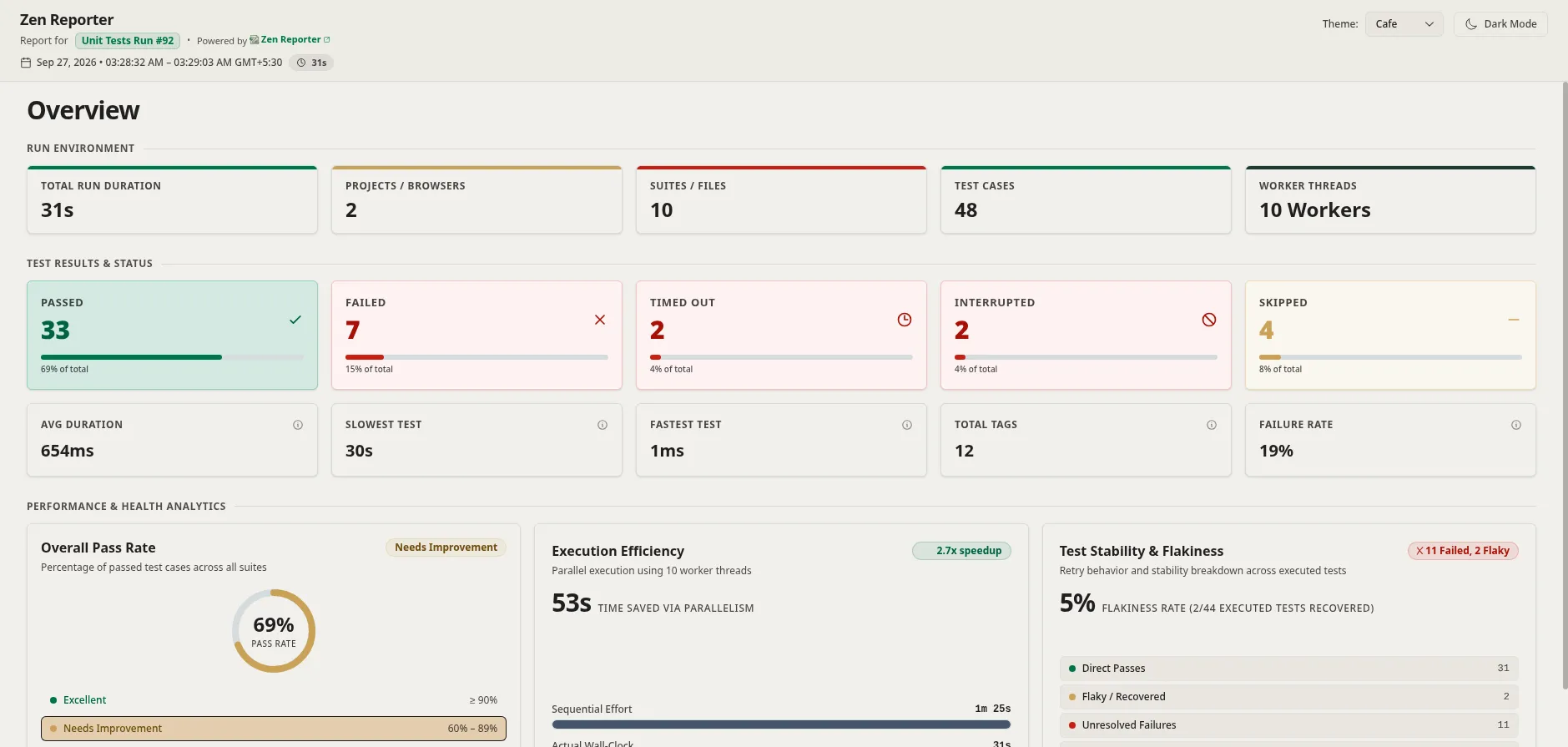
summary.html
Key Differences (summary.html vs index.html)
Section titled “Key Differences (summary.html vs index.html)”| Feature | index.html (Full Report) |
summary.html (Executive Summary) |
|---|---|---|
| Interactive Navigation | Full tabs (Overview, Suites, Files, Failures, Projects, History, Trends, Insights) | Single-page high-level dashboard |
| Failure Diagnostics | Full trace step timeline (▶), source code frames, diff traces |
High-level failure counts only |
| Attachments & Traces | Embedded screenshots, videos, trace files | Excluded for minimal file size |
| File Size | Larger (includes full execution details & assets) | Extremely small & lightweight |