
zr - The Zen Reporter CLI
The Zen Reporter Command-Line Interface (zr / zen-reporter) provides a powerful suite of terminal utilities for managing, viewing, summarizing, and querying test run history in Zen Reporter. Powered by an embedded DuckDB analytics engine, zr allows developers and CI/CD pipelines to inspect test run results directly from the terminal, generate markdown summaries for Pull Requests, and run arbitrary SQL queries on historic JSONL run files.
🏗️ Overview & Binary Setup
Section titled “🏗️ Overview & Binary Setup”When zen-reporter is installed as a package dependency, npm/yarn/pnpm exposes two binary aliases:
zr: Short-form convenient alias.zen-reporter: Full-name binary target.
# Executing via npx / package runnernpx zr <command> [options]
# Directly via npm scripts in package.jsonnpm run show
Automatic Package Manager Detection
Section titled “Automatic Package Manager Detection”zr intelligently auto-detects the host environment’s package manager (pnpm, yarn, bun, or npm) by inspecting lockfiles (pnpm-lock.yaml, yarn.lock, bun.lock, package-lock.json, .npmrc) and package.json to execute Playwright CLI commands seamlessly.
📜 CLI Architecture & Workflow
Section titled “📜 CLI Architecture & Workflow”┌────────────────────────────────────────────────────────────────────────────────────────┐│ Zen Reporter CLI (`zr`) │├───────────────────┬──────────────────────┬───────────────────────────────┬─────────────┤│ `zr show` │ `zr summary` │ `zr history` │ `zr env` ││ Launches local │ Markdown report │ DuckDB-powered analytics │ Environment ││ Playwright viewer │ for CI / PR comments │ (runs, flaky, slow, SQL) │ details │└─────────┬─────────┴─────────┬────────────┴───────────────┬───────────────┴─────────────┘ │ │ │ ▼ ▼ ▼ zen-report/index.html zen-report/report.json zen-report/runs/*.jsonl🔍 Commands Reference
Section titled “🔍 Commands Reference”1. zr show
Section titled “1. zr show”Serves and opens the generated HTML report locally in a browser using Playwright’s built-in web server.
npx zr show- Environment Override: Reads output directory path from
PW_REPORTER_OUTPUT(defaults tozen-report). - Behavior: Verifies that
zen-report/index.htmlexists and delegates server execution to<package-manager> exec playwright show-report zen-report.
2. zr summary
Section titled “2. zr summary”Parses zen-report/report.json and prints a structured, GitHub-flavored Markdown summary snippet to stdout. Perfect for pasting into GitHub Actions PR comments or Slack build notifications.
npx zr summarySample Output
Section titled “Sample Output”### 📊 Test Run Summary: Test Automation Project — Test Run
**Status:** ❌ FAILED**Duration:** 1m 14s**Pass Rate:** 85.7%
| Total | Passed | Failed | Timed Out | Skipped || :---: | :----: | :----: | :-------: | :-----: || 21 | 18 | 2 | 1 | 0 |
#### ❌ Failed Tests (3)
- **[chromium]** `tests/auth.spec.ts` › User login with invalid credentials- **[firefox]** `tests/checkout.spec.ts` › Complete purchase flow- **[webkit]** `tests/api.spec.ts` › Fetch user profile timeout3. zr history (DuckDB Analytics Engine)
Section titled “3. zr history (DuckDB Analytics Engine)”zr history subcommands execute high-performance analytical queries across historic newline-delimited JSON (runs/*.jsonl) files stored in the output directory (zen-report/runs).
[!NOTE]
zr historycommands rely on@duckdb/node-api. Ensure@duckdb/node-apiis installed in your project’sdevDependenciesorpeerDependencies.
Subcommands
Section titled “Subcommands”| Subcommand | Description | Example Usage |
|---|---|---|
zr history / zr history runs |
Lists all recorded historical runs with overall pass/fail metrics. | npx zr history runs |
zr history flaky |
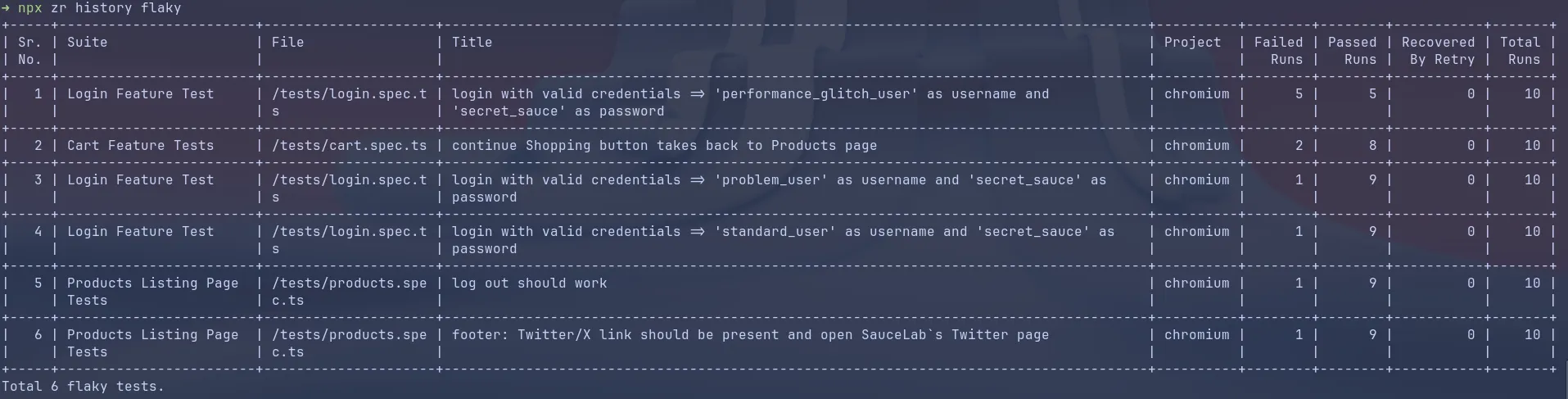
Lists tests that failed in some runs and passed in others across history. | npx zr history flaky |
zr history regressions |
Displays test cases that passed in an earlier run but regressed (failed) in subsequent runs. | npx zr history regressions |
zr history slow [--limit N] |
Identifies the slowest tests across all runs by average duration (default limit 10). | npx zr history slow --limit 15 |
zr history trend |
Displays overall per-run pass rates over time. | npx zr history trend |
zr history files |
Shows aggregate spec file historical metrics and overall pass rates. | npx zr history files |
zr history tests |
Shows aggregate individual test execution metrics. | npx zr history tests |
zr history report |
Compiles history.json and embeds history data directly into index.html for the web UI History tab. |
npx zr history report |
zr history query "<SQL>" |
Executes an arbitrary SQL query against historic run files using DuckDB SQL. | npx zr history query "SELECT * FROM runs WHERE status='failed'" |
4. zr env
Section titled “4. zr env”Prints environment diagnostic information to stdout, useful for verifying package versions and debugging environment setup in CI/CD pipelines or local development. If you ever need to report a bug against Zen Reporter, then this command can come handy.
npx zr envReported Details
Section titled “Reported Details”zen-reporterversion: Installed version of Zen Reporter.@playwright/testversion: Installed Playwright framework version.- Node.js version: Active Node.js runtime version.
- OS: Host operating system and platform architecture.
Example Output
Section titled “Example Output”zen-reporter version: 0.11.0@playwright/test version: 1.63.0Node.js version: v20.11.0OS: macOS💻 Terminal Table Formatting Engine
Section titled “💻 Terminal Table Formatting Engine”zr history features a built-in terminal table renderer designed for CLI legibility:
- Auto-wrapping & Column Flexing: Responsive column width calculation prevents line-wrapping on narrow screens.
- Proper Header Casing: Converts database column names (e.g.
avg_duration_ms) into clean display headers (Avg Duration). - Smart Formatting:
- Millisecond durations (
_ms) are formatted as human-readable durations (1m 24sor45s). - Timestamps (
_at) are formatted into ISO local dates (YYYY-MM-DD HH:MM:SS). - Numbers and percentages are right-aligned while text fields remain left-aligned.
- Millisecond durations (
⚡ Custom SQL Querying with zr history query
Section titled “⚡ Custom SQL Querying with zr history query”The query subcommand grants full access to DuckDB’s SQL syntax. The table/view runs is automatically bound to read_json('zen-report/runs/*.jsonl', format='newline_delimited').
# Query failed tests in WebKit project with duration > 5000msnpx zr history query "SELECT file, title, duration_ms FROM runs WHERE project = 'webkit' AND status = 'failed' AND duration_ms > 5000 ORDER BY duration_ms DESC"Tip: Use JSONL schema to construct your queries.